This training article will help you understand how to create the goals and objectives and utilize TherapyMate's built-in workflows to get the best results.
Step 1
A clinician should schedule a 90791 appointment and create an Intake Note for the client's first session.
When the Intake Note is created and saved, the clinician will be prompted to create a Treatment Plan. You're given the option to create one now or cancel and come back and do it later.
If you choose to do it now, the Presenting Problem and Concern and Diagnosis Codes will carry over from the Intake Note to the Treatment Plan automatically if you specified them.
You will notice that the diagnosis codes you set on the Intake Note are now showing on the Client's information page. From this point forward, any new note you create will look at the client's information page for the diagnosis codes. In other words, these codes are now the defaults. If you need to change or add a new diagnosis code to the client's chart during the course of treatment this is where you need to make those changes prior to creating any more notes.
Step 2
Create the Treatment Plan using the template provided in TherapyMate. Add Goals, Objectives and Interventions by clicking on the + Add Goals & Objectives link. Also specify the estimate time for completion.
Here is an example of what that might look like when completed.

If you want the client to sign the Treatment Plan after saving it, there are two methods. Click on one of the following Help Center articles to learn more.
Client Signature-In Office Method
Client Signature-Client Portal Method
At this point in the process you have an Intake Note and Treatment Plan. Now schedule the client for their next appointment. You could use the service code of 90834, 90837, 90847 to the reminder to create the Standard Progress Note appears on your Dashboard.
In the example below, we scheduled the client for a 90837. When the session is over the clinician clicks on the reminder to create the Standard Progress Note. The only note type that will allow the Goals and Objectives to carry over automatically from note to note is the Standard Progress Note.
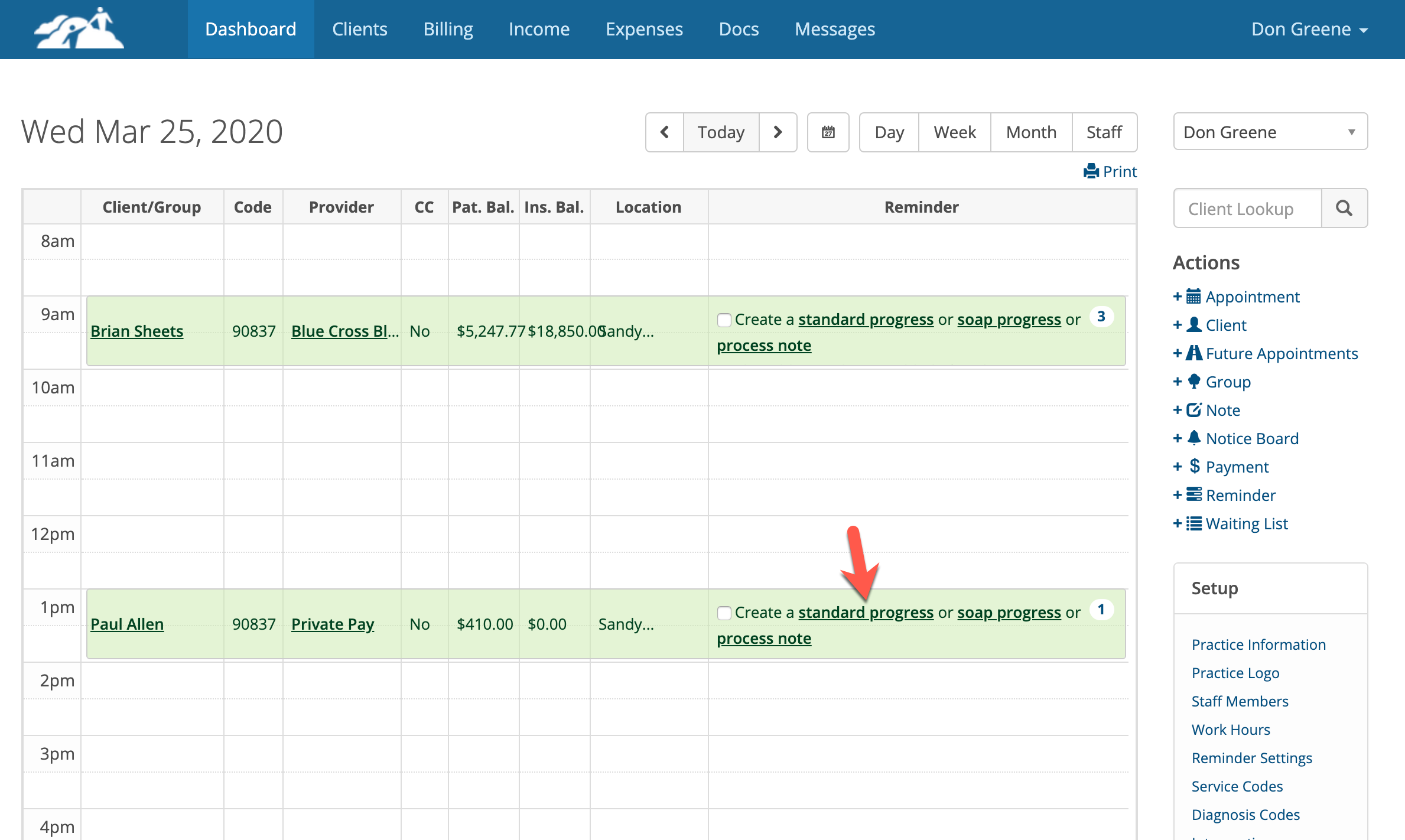
Next time you schedule the client and do a Standard Progress note any changes you made to the last Standard Progress note will carry forward to the next Standard Progress note UNLESS you marked a Goal and Objectives as achieved. Achieved Goals and Objectives stop flowing forward, but the Treatment Plan will be updated with the new status to show that goal has been achieved.
Understanding the Work Flow
- If you need to add a new Goal and Objective during the course of treatment, you have two choices, do it on the existing Treatment Plan or on the next Standard Progress Note. We recommend that you do it on the next Standard Progress Note.
- Changes to the Treatment Plan will NOT update notes that have already been created and saved.
- New Goals and Objectives you add to the Treatment Plan WILL carry forward to the next Standard Progress Note when you create it, but NOT on previously created Standard Progress Notes.
- If you add a new Goal and Objective to your last Standard Progress Note it will carry forward to the next new Standard Progress Note you create, but will NOT update the Treatment Plan or previously created Standard Progress Notes.
- When an existing Goal and Objective has been marked as Achieved on a Standard Progress Note, it will not appear on future Standard Progress Notes you create.
- You can't change the Progress of the Goal and Objective on the Treatment Plan. You must do it on the latest Standard Progress note.
- Changing the progress on a Standard Progress note will however update the existing Treatment Plan.
- If you add more information to an existing Goal and/or Objective in their respective boxes on a Standard Progress Note, that additional information will carry forward to the next note you create, but not to older notes that were previously created.
- If you create a new Treatment Plan, it will completely replace the old one. None of the information from the old plan including the Goals and Objectives will carry forward anymore regardless of their Progress. So finalize the old Treatment Plan by marking the goals and objectives as achieved or not achieved on the old Treatment Plan.
- If a patient is reassigned to another Clinician or has another Clinician assigned to the chart, the new Clinician can see the old Treatment plan if it is shared with them, but they will not be able to edit it. The new Clinician must create their own Treatment Plan.
- The date sequence on notes is very important. Make sure when you create a Treatment Plan or Standard Progress Note that the correct appointment date is assigned from the date drop down. If you see older dates in the dropdown it means the clinician is not doing notes for every session. Always make sure you're work with the most recent date. The date on the Treatment Plan should come before the next appointment when you create a Standard Progress Note.