If a client has pre-approved Authorizations or Employee Assisted Program (EAP) benefits from their insurance provider it means they get so many, pre-determined, no cost appointments.
When a client's chart is configured the bottom of their insurance billing page for the authorizations or EAPs you'll need to make sure that the appointments are created properly so they get used and billed properly.
Scheduling an Authorization & Checking their Authorizations
When you create an appointment for an Authorization or EAP on the Dashboard, please make sure the EAP checkbox is checked at the bottom of the appointment window. See below:
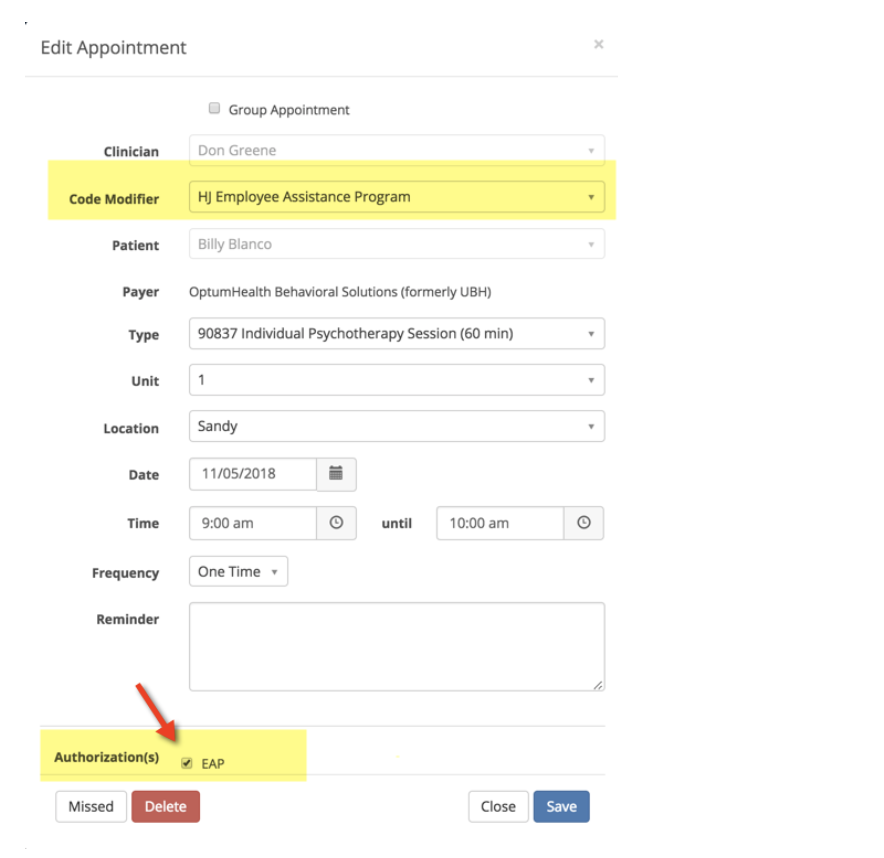
If the insurance provider requires a special Code Modifier choose that from the drop down. The most common one is HJ.
If you don’t have the appropriate Code Modifiers in the drop down, they can be added by your System Administrator.
Viewing Authorized Appointments the Dashboard
When you schedule an authorized client, there will be a reference in the reminder column on your Dashboard. See the example below:

This is an indicator that this client has 5 authorized sessions and this appointment is using the first one. The second appointment will show "Authorized EAP visit 2 of 5 and so on.
When all of the authorizations are used it will indicate that. If you try to create a new appointment after all of the authorizations are used, the system won't let you. The authorization checkbox will be grayed out.
IMPORTANT - Please inform the client that their authorizations are used up and ask them how they want to pay for your service going forward. They have the following options:
1. Pay out of pocket for your services (cash rate)
2. Start using their insurance provider for non-EAP services (copays and deductibles will apply)
3. Obtain a new set of authorizations from their insurance provider
Any of these will require the client's billing settings to be reconfigured. Please inform your Practice owner or billing person when the client has made their choice. The changes must be in place before their next appointment is scheduled or occurs. This will allow the Practice to bill properly for the next appointment and avoid any surprises when payments are collected.